




Latest Version
Version
2610.1.1
2610.1.1
Update
October 17, 2026
October 17, 2026
Developer
Microsoft Corporation
Microsoft Corporation
Categories
Entertainment
Entertainment
Platforms
Android
Android
Downloads
0
0
License
Free
Free
Package Name
com.microsoft.xboxone.smartglass
com.microsoft.xboxone.smartglass
Report
Report a Problem
Report a Problem
More About XBOX
XBOX keeps you connected to the fun with your friends, games, and supported gaming devices from your phone or tablet while on the go. Buy games you want without leaving the app. Explore Game Pass, queue games to play, set alerts for new games, and more. Keep up with friends and parties with voice and text chat, even if they're on console or PC. Share your wishlist, game clips, and screenshots from your console to favorite gaming & social networks. See game invite notifications and achievements from you and your friends, messages, and more. Track, claim, and redeem your Rewards points. Stay connected to your world of gaming with the XBOX mobile app.
The Xbox app brings key parts of your Xbox gaming experience to your Android phone or tablet. Chat with friends, browse Game Pass, manage your console, share captures, and keep up with achievements while you’re away from your gaming setup.
Your gaming life doesn’t have to stop when you leave the console. The Xbox app helps you stay connected to your friends, games, and supported Xbox devices from your phone, making it easier to chat, check activity, and manage downloads on the go.
Whether you want to arrange a gaming session, browse Game Pass, or install a game remotely before you get home, the app offers a convenient companion to the Xbox ecosystem. It is especially useful for players who want their console, social connections, and game activity within easy reach.
Xbox is Microsoft’s mobile companion app for Android. It connects your phone with your Xbox profile and supported gaming services, letting you message friends, join voice or text parties, view achievements and notifications, share console captures, and remotely install games to a linked console. Available features can depend on your account, region, console, and subscriptions.
An APK is the package file format Android uses to distribute and install apps. Installing an Xbox APK manually can be useful when an app is unavailable through your usual store, but it is important to use a trustworthy source and verify that the file is authentic and up to date.
Pros
Cons
Users commonly value the app for keeping Xbox friends, messages, achievements, and console activity accessible from a phone. Remote installation and quick access to game captures are also convenient for players who regularly use the Xbox ecosystem.
Some users report occasional sign-in difficulties, delayed notifications, or connection problems. Experiences can vary across Android devices and app releases, and certain features depend on a compatible console, account settings, subscription, or stable internet connection.
The Xbox app is a useful companion for anyone who plays on Xbox and wants to stay connected outside the living room. Its strongest points are friend communication, notifications, game discovery, capture sharing, and the ability to manage selected console tasks remotely.
It is most worthwhile for active Xbox players, especially those who use Game Pass or regularly coordinate sessions with friends. If you do not use Xbox services, the app may offer little value; for Xbox owners, however, it is a convenient way to keep your gaming world close at hand.
Download Xbox from Google Play or another source you trust, and avoid modified or unknown APK files. Unofficial APKs can be altered to contain malware, request excessive permissions, or put account and personal data at risk. Check the developer and app permissions before installing, and keep Android and the app updated.
Manual APK installation may require allowing installs from an unknown source for the app you use to open the file. Enable this permission only when necessary, use a reputable source, and turn it off again afterward. Review Microsoft’s applicable terms and privacy information before signing in or using account-connected features.
Q1: Is the Xbox app free to use?
A1: The app is generally free to download. Some games, purchases, subscriptions, or connected services may cost extra.
Q2: Do I need an internet connection to use Xbox?
A2: Most account, messaging, store, remote-installation, and social features require an internet connection. Availability also depends on the relevant Xbox service and your device.
Q3: Is it safe to download the Xbox APK?
A3: The safest option is to install the official app through Google Play. If you install an APK manually, use a trusted source and avoid modified files, which may expose your device or account to malware and privacy risks.
Q4: Can I install Xbox games remotely with the app?
A4: The app supports remote game installation for compatible linked consoles and titles. Your console settings, account, network connection, and regional availability may affect whether the feature works.
Q5: Do I need Game Pass to use the Xbox app?
A5: No. You can use many companion features without Game Pass, but access to Game Pass games and subscription benefits requires an eligible subscription.
Xbox APK
📱 Xbox APK Summary
The Xbox app brings key parts of your Xbox gaming experience to your Android phone or tablet. Chat with friends, browse Game Pass, manage your console, share captures, and keep up with achievements while you’re away from your gaming setup.
- App Name: Xbox
- Current Version: Version details vary by device and rollout; check Google Play for the latest release.
- Last Updated: The update date varies by region and Play Store listing.
- Category: Entertainment
- Developer: Microsoft Corporation
- Google Play Rating: Ratings and review counts change over time; check Google Play for current figures.
💡 Introduction
Your gaming life doesn’t have to stop when you leave the console. The Xbox app helps you stay connected to your friends, games, and supported Xbox devices from your phone, making it easier to chat, check activity, and manage downloads on the go.
Whether you want to arrange a gaming session, browse Game Pass, or install a game remotely before you get home, the app offers a convenient companion to the Xbox ecosystem. It is especially useful for players who want their console, social connections, and game activity within easy reach.
❓ What Is Xbox APK?
Xbox is Microsoft’s mobile companion app for Android. It connects your phone with your Xbox profile and supported gaming services, letting you message friends, join voice or text parties, view achievements and notifications, share console captures, and remotely install games to a linked console. Available features can depend on your account, region, console, and subscriptions.
An APK is the package file format Android uses to distribute and install apps. Installing an Xbox APK manually can be useful when an app is unavailable through your usual store, but it is important to use a trustworthy source and verify that the file is authentic and up to date.
🧑💻 How to Use
- Install and open the app: Get Xbox through Google Play or another trusted distribution source, then launch it.
- Sign in: Log in with your Microsoft account. Use the account associated with your Xbox profile for the most complete experience.
- Explore your profile: Check your activity, achievements, friends, messages, and notifications from the app’s navigation.
- Connect with friends: Find friends, send messages, and use supported voice or text party features to coordinate play.
- Manage your console: Link a compatible Xbox console and use available remote features, such as starting a game installation from your phone.
- Browse games and Game Pass: Explore available titles, view recommendations, and manage your play queue. Game Pass features require an eligible subscription where applicable.
- Share and shop: Share supported game captures to social platforms, browse games for purchase, and check eligible Microsoft Rewards activity.
⚙️ Features
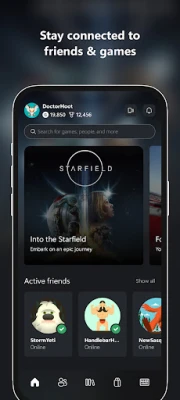
- Friends, messages, and parties: Stay in touch with Xbox friends through chat features, including when they are using a supported console or PC experience.
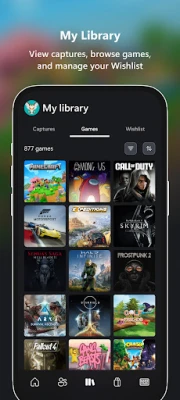
- Console capture sharing: View and share supported screenshots and game clips to compatible social and gaming networks.
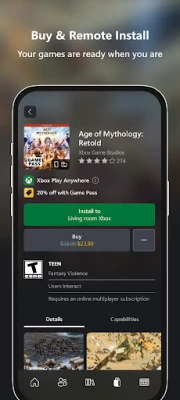
- Remote game installation: Queue downloads to a linked console from your phone, helping a game get ready before your next session.
- Notifications and achievements: Keep track of game invites, messages, achievements, and activity from friends.
- Game Pass discovery: Browse available games, see recommendations, and use supported features to keep track of titles you want to play. Access to subscription benefits depends on eligibility.
- Game browsing and purchases: Explore and buy supported games through the app without needing to start from your console.
- Rewards access: View, track, and redeem eligible Microsoft Rewards points through supported account features.
✅ Pros and ❌ Cons
Pros
- Brings useful Xbox social and account features together in one mobile app.
- Makes it easier to message friends and keep up with gaming activity away from the console.
- Remote installation can save time when preparing for a gaming session.
- Supports browsing captures, achievements, game recommendations, and selected store features.
- Free to download, although some services or content may require a subscription or purchase.
Cons
- Some features require a compatible Xbox console, an internet connection, or a Microsoft account.
- Game Pass content and benefits require an eligible subscription where applicable.
- Feature availability may differ by region, device, account, or service status.
- Users may encounter sign-in, notification, or connectivity issues depending on their device and network.
- The app is a companion rather than a replacement for playing console games directly.
📋 App Details
- App Name: Xbox
- Current Version: Check Google Play for the version currently available to your device.
- Last Updated: Check the store listing for the latest update date in your region.
- File Size: Varies by version, Android device, and installation source.
- Requires Android: Minimum requirements can change; confirm compatibility on the app’s current store listing.
- Developer: Microsoft Corporation
- Content Rating: Check the Google Play listing for the current regional rating.
💬 User Reviews
Users commonly value the app for keeping Xbox friends, messages, achievements, and console activity accessible from a phone. Remote installation and quick access to game captures are also convenient for players who regularly use the Xbox ecosystem.
Some users report occasional sign-in difficulties, delayed notifications, or connection problems. Experiences can vary across Android devices and app releases, and certain features depend on a compatible console, account settings, subscription, or stable internet connection.
🔍 5 Best Alternative Games/Apps
- PlayStation App: Sony’s mobile companion for PlayStation users, with features for managing account activity, messaging friends, and browsing the PlayStation Store.
- Steam: A companion app for PC gamers to browse the Steam storefront, manage account security, and keep up with friends and community activity.
- Discord: A popular communication platform for gaming communities, offering voice channels, text chat, and group servers across supported devices.
- NVIDIA GeForce NOW: A cloud gaming service that lets eligible users stream supported PC games on compatible devices, subject to service and game requirements.
- PS Remote Play: An option for PlayStation owners who want to stream gameplay from a compatible console to a supported mobile device over a network connection.
🧠 My Opinion
The Xbox app is a useful companion for anyone who plays on Xbox and wants to stay connected outside the living room. Its strongest points are friend communication, notifications, game discovery, capture sharing, and the ability to manage selected console tasks remotely.
It is most worthwhile for active Xbox players, especially those who use Game Pass or regularly coordinate sessions with friends. If you do not use Xbox services, the app may offer little value; for Xbox owners, however, it is a convenient way to keep your gaming world close at hand.
🛡️ Privacy and Security
Download Xbox from Google Play or another source you trust, and avoid modified or unknown APK files. Unofficial APKs can be altered to contain malware, request excessive permissions, or put account and personal data at risk. Check the developer and app permissions before installing, and keep Android and the app updated.
Manual APK installation may require allowing installs from an unknown source for the app you use to open the file. Enable this permission only when necessary, use a reputable source, and turn it off again afterward. Review Microsoft’s applicable terms and privacy information before signing in or using account-connected features.
❓ Frequently Asked Questions (FAQs)
Q1: Is the Xbox app free to use?
A1: The app is generally free to download. Some games, purchases, subscriptions, or connected services may cost extra.
Q2: Do I need an internet connection to use Xbox?
A2: Most account, messaging, store, remote-installation, and social features require an internet connection. Availability also depends on the relevant Xbox service and your device.
Q3: Is it safe to download the Xbox APK?
A3: The safest option is to install the official app through Google Play. If you install an APK manually, use a trusted source and avoid modified files, which may expose your device or account to malware and privacy risks.
Q4: Can I install Xbox games remotely with the app?
A4: The app supports remote game installation for compatible linked consoles and titles. Your console settings, account, network connection, and regional availability may affect whether the feature works.
Q5: Do I need Game Pass to use the Xbox app?
A5: No. You can use many companion features without Game Pass, but access to Game Pass games and subscription benefits requires an eligible subscription.
Rate the App
Add Comment & Review
User Reviews
Based on 0 reviews
No reviews added yet.
Comments will not be approved to be posted if they are SPAM, abusive, off-topic, use profanity, contain a personal attack, or promote hate of any kind.












More »

Popular Apps

TradingView: Track All MarketsTradingView Inc.

Bus Fever Party!Lumi Games

Claude by AnthropicAnthropic PBC

Block Craft 3D:Building GameWildlife Studios

Malwarebytes - Mobile SecurityMalwarebytes

Block Blast!HungryStudio

Canva: AI Photo & Video EditorCanva

Candy Crush SagaKing

Carrom Pool: Disc GameMiniclip.com

EA SPORTS FC Soccer Mobile 27ELECTRONIC ARTS
More »
Editor's Choice

Kahoot! Play & Create QuizzesKahoot!

United AirlinesUnited Airlines

Tripwoa: Travel Plan & Trailtripwoa

trivago: Compare hotel pricestrivago N.V.

Planner 5D: AI Home DesignPlanner 5D

ibis Paint Xibis inc.

Agoda: Cheap Flights & Hotelsagoda.com

Hopper: Hotels, Flights & CarsHopper Inc.

Brilliant: Learn Math & CodingBrilliant.org

Google ClassroomGoogle LLC