

Latest Version
Update
October 14, 2026
October 14, 2026
Developer
Roblox Corporation
Roblox Corporation
Categories
Games
Games
Platforms
Android
Android
Downloads
0
0
License
Free
Free
Package Name
com.roblox.client
com.roblox.client
Report
Report a Problem
Report a Problem
More About Roblox
ROBLOX – MILLIONS OF GAMES ACROSS EVERY GENRE. PLAY FREE.
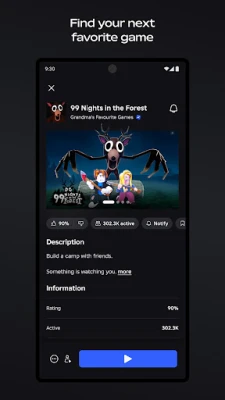
Roblox is an online platform where players can explore, create, and share a huge variety of user-made games and virtual experiences. From role-playing and racing to fashion, action, and simulation games, it offers something for many tastes and supports playing with friends across compatible devices.
Finding a game that suits everyone can be difficult, but Roblox brings thousands of different experiences together in one place. Players can jump into a quick multiplayer match, build a virtual home, take on an adventure, or meet friends in social worlds—all through a single app.
Its community-driven library is always changing. New experiences and updates arrive regularly, so Roblox can feel less like one game and more like a constantly expanding playground.
Roblox is an online gaming and creation platform for players who enjoy exploring a wide range of interactive experiences. Much of its content is made by users and independent creators, covering genres such as role-playing, simulators, racing, action, horror, sports, fashion, and tycoon games. Popular experiences include Dress to Impress, RIVALS, Steal a Brainrot, Brookhaven RP, and Adopt Me!
The app also lets players customize an avatar, connect with friends, and join compatible cross-platform experiences. People who want to create games can use Roblox Studio on Windows or Mac; the mobile app is mainly for playing and socializing rather than building full experiences.
An APK is the package format Android uses to install applications. Downloading a Roblox APK can allow manual installation, but the Google Play version is generally the simplest way to receive official updates and verify the app publisher.
Pros
Cons
Players commonly praise Roblox for its variety, the ability to find experiences for different moods, and the fun of playing with friends. Avatar customization and the steady flow of new community content are also popular aspects.
Common concerns include uneven quality between experiences, performance or loading problems on some devices, and the need to manage in-app purchases and communication settings. Because Roblox includes user-created content, the experience can differ substantially from one game to another.
Roblox stands out because it brings a large range of player-made games and social experiences together in one accessible platform. Its greatest strength is variety: players can switch from a role-playing world to a competitive match or a creative hangout without changing apps.
It is worth considering if you enjoy online multiplayer, customization, and discovering community-made content. Families should take time to review privacy, chat, content, and spending controls, while players with older devices may want to check performance expectations. For anyone seeking a constantly changing collection of games to explore with friends, Roblox offers plenty to try.
Download Roblox from Google Play or another reputable source, and check that the developer is Roblox Corporation. Be cautious with unofficial APK files: modified or counterfeit installers can contain malware, compromise account details, or create privacy risks.
Manual APK installation may require enabling Install unknown apps for the app used to open the file in Android settings. Only enable this for a trusted source, and turn it off again when you are finished. Keep Android and Roblox updated, use a strong unique password, and review account privacy, communication, and parental controls regularly.
Q1: Is Roblox APK free to use?
A1: Roblox is generally free to download and play, but some experiences, items, and optional services may require Robux or a subscription.
Q2: Do I need an internet connection to play Roblox?
A2: Yes. Roblox is an online platform, so a network connection is required for most games and features. Wi-Fi is recommended for a smoother experience.
Q3: Is it safe to download the Roblox APK?
A3: Use the official Google Play listing where possible. If installing manually, choose a reputable source and verify the publisher; unofficial or modified APKs may expose your device or account to security risks.
Q4: Can I create Roblox games on my phone?
A4: The mobile app is primarily for playing and social features. Roblox Studio, the main creation tool, is available for Windows and Mac computers.
Q5: Can I play Roblox with friends on other devices?
A5: Many experiences support cross-platform multiplayer, but support depends on the individual experience, device, and account settings.
Roblox APK
📱 Roblox APK Summary
Roblox is an online platform where players can explore, create, and share a huge variety of user-made games and virtual experiences. From role-playing and racing to fashion, action, and simulation games, it offers something for many tastes and supports playing with friends across compatible devices.
- App Name: Roblox
- Current Version: Version numbers vary by release and region; check Google Play for the latest build
- Last Updated: The app is updated regularly; check Google Play for the current update date
- Category: Adventure
- Developer: Roblox Corporation
- Google Play Rating: Ratings and review counts change over time; see Google Play for the live rating
💡 Introduction
Finding a game that suits everyone can be difficult, but Roblox brings thousands of different experiences together in one place. Players can jump into a quick multiplayer match, build a virtual home, take on an adventure, or meet friends in social worlds—all through a single app.
Its community-driven library is always changing. New experiences and updates arrive regularly, so Roblox can feel less like one game and more like a constantly expanding playground.
❓ What Is Roblox APK?
Roblox is an online gaming and creation platform for players who enjoy exploring a wide range of interactive experiences. Much of its content is made by users and independent creators, covering genres such as role-playing, simulators, racing, action, horror, sports, fashion, and tycoon games. Popular experiences include Dress to Impress, RIVALS, Steal a Brainrot, Brookhaven RP, and Adopt Me!
The app also lets players customize an avatar, connect with friends, and join compatible cross-platform experiences. People who want to create games can use Roblox Studio on Windows or Mac; the mobile app is mainly for playing and socializing rather than building full experiences.
An APK is the package format Android uses to install applications. Downloading a Roblox APK can allow manual installation, but the Google Play version is generally the simplest way to receive official updates and verify the app publisher.
🧑💻 How to Use
- Install and open Roblox: Get the app from Google Play or another trusted source, then launch it on your Android device.
- Sign in or create an account: Follow the on-screen steps to set up or access your account. Use accurate age information and review the available privacy settings.
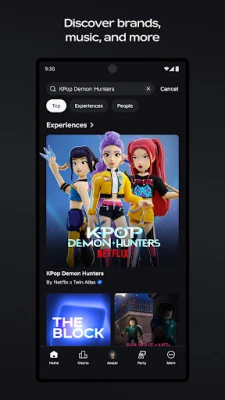
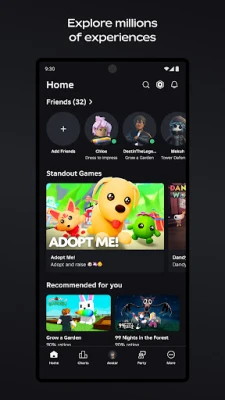
- Choose an experience: Browse recommendations, search for a title, or explore categories to find a game that interests you.
- Join a game: Tap an experience and select the play button. Most experiences require an internet connection.
- Learn the controls: On mobile, movement and actions are usually controlled with on-screen buttons, a virtual joystick, or touch gestures. Controls can differ between experiences.
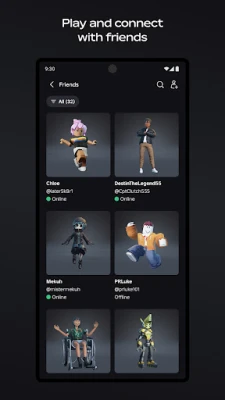
- Play with others: Add friends or join them in compatible experiences. Party and communication features may depend on account eligibility, settings, and age verification.
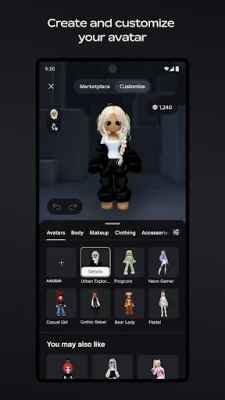
- Personalize your avatar: Visit the avatar and Marketplace areas to explore outfits, accessories, hairstyles, and other customization options. Some items may require Robux.
⚙️ Features
- A broad library of experiences: Explore community-created games across role-playing, simulation, action, adventure, racing, sports, horror, and more.
- Fresh content: New experiences and updates are added regularly, making it easy to discover something different on repeat visits.
- Avatar customization: Dress up a personal avatar with clothing, accessories, hairstyles, and expressive emotes, including items created by the community.
- Online multiplayer: Join friends and other players in social spaces, cooperative adventures, and competitive games.
- Cross-platform play: Many experiences support play with users on mobile, tablet, PC, console, and VR, though availability varies by game and device.
- Social and communication tools: Players can connect through supported friend, Party, text, and voice features. Access to communication tools may depend on eligibility and account settings.
- Creator community: Roblox Studio gives creators tools to build and publish experiences using a Windows or Mac computer.
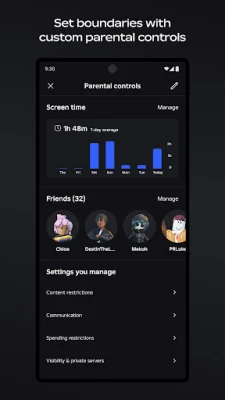
- Safety and privacy controls: Moderation, content filtering, account controls, and age-related features help families manage how users interact with the platform.
- Optional Roblox Plus benefits: Eligible subscribers may receive benefits such as discounts on certain in-game items, fee-free Robux transfers, a profile badge, and private server perks. Benefits and availability may change.
✅ Pros and ❌ Cons
Pros
- Offers a wide variety of games and social experiences in one app.
- Regularly updated library gives players new content to explore.
- Avatar customization makes it easy to express a personal style.
- Many experiences support playing with friends across different platforms.
- Players can enjoy community creations without needing to make a game themselves.
Cons
- Experience quality varies because games are made by many different creators.
- A reliable internet connection is needed for most features and games.
- Some avatar items and in-game benefits cost Robux or require a subscription.
- Performance can vary by device, and graphically demanding experiences may not run smoothly on older phones.
- Parents and players should review chat, privacy, spending, and content settings carefully.
📋 App Details
- App Name: Roblox
- Current Version: Changes with updates; check Google Play or the installed app for the latest version
- Last Updated: Updated regularly; the current date can vary by store region
- File Size: Varies by version, device, and downloaded content; check the installer listing for the exact size
- Requires Android: Minimum requirements can change; confirm compatibility on the Google Play listing for your device
- Developer: Roblox Corporation
- Content Rating: Varies by region and store listing; review the current rating and parental guidance details before installation
- Internet: Required for online play and most platform features; Wi-Fi is recommended
- Optional permissions: Notifications, microphone, camera, and contacts may be requested for related features. These permissions are optional, though some features may not work without them.
💬 User Reviews
Players commonly praise Roblox for its variety, the ability to find experiences for different moods, and the fun of playing with friends. Avatar customization and the steady flow of new community content are also popular aspects.
Common concerns include uneven quality between experiences, performance or loading problems on some devices, and the need to manage in-app purchases and communication settings. Because Roblox includes user-created content, the experience can differ substantially from one game to another.
🔍 5 Best Alternative Games/Apps
- Minecraft: A creative sandbox game focused on building, exploration, and survival. It is a strong alternative for players who enjoy making their own worlds and playing with friends.
- PK XD: A colorful social game where players customize avatars, explore a virtual world, and take part in activities. It suits users looking for a casual, friendly online space.
- Rec Room: A multiplayer social platform featuring user-created rooms and games. Its emphasis on meeting friends and trying community experiences makes it a close match for Roblox’s social side.
- LEGO Fortnite: A family-friendly creative survival experience with building, exploration, and cooperative play. It may appeal to players who enjoy crafting and shared adventures.
- Terraria: A 2D sandbox adventure with crafting, exploration, combat, and building. It offers a more structured game world for players who want creative freedom alongside progression.
🧠 My Opinion
Roblox stands out because it brings a large range of player-made games and social experiences together in one accessible platform. Its greatest strength is variety: players can switch from a role-playing world to a competitive match or a creative hangout without changing apps.
It is worth considering if you enjoy online multiplayer, customization, and discovering community-made content. Families should take time to review privacy, chat, content, and spending controls, while players with older devices may want to check performance expectations. For anyone seeking a constantly changing collection of games to explore with friends, Roblox offers plenty to try.
🛡️ Privacy and Security
Download Roblox from Google Play or another reputable source, and check that the developer is Roblox Corporation. Be cautious with unofficial APK files: modified or counterfeit installers can contain malware, compromise account details, or create privacy risks.
Manual APK installation may require enabling Install unknown apps for the app used to open the file in Android settings. Only enable this for a trusted source, and turn it off again when you are finished. Keep Android and Roblox updated, use a strong unique password, and review account privacy, communication, and parental controls regularly.
❓ Frequently Asked Questions (FAQs)
Q1: Is Roblox APK free to use?
A1: Roblox is generally free to download and play, but some experiences, items, and optional services may require Robux or a subscription.
Q2: Do I need an internet connection to play Roblox?
A2: Yes. Roblox is an online platform, so a network connection is required for most games and features. Wi-Fi is recommended for a smoother experience.
Q3: Is it safe to download the Roblox APK?
A3: Use the official Google Play listing where possible. If installing manually, choose a reputable source and verify the publisher; unofficial or modified APKs may expose your device or account to security risks.
Q4: Can I create Roblox games on my phone?
A4: The mobile app is primarily for playing and social features. Roblox Studio, the main creation tool, is available for Windows and Mac computers.
Q5: Can I play Roblox with friends on other devices?
A5: Many experiences support cross-platform multiplayer, but support depends on the individual experience, device, and account settings.
Rate the App
Add Comment & Review
User Reviews
Based on 0 reviews
No reviews added yet.
Comments will not be approved to be posted if they are SPAM, abusive, off-topic, use profanity, contain a personal attack, or promote hate of any kind.




More »

Popular Apps

TradingView: Track All MarketsTradingView Inc.

Bus Fever Party!Lumi Games

Claude by AnthropicAnthropic PBC

Block Craft 3D:Building GameWildlife Studios

Malwarebytes - Mobile SecurityMalwarebytes

Block Blast!HungryStudio

Canva: AI Photo & Video EditorCanva

Candy Crush SagaKing

Carrom Pool: Disc GameMiniclip.com

EA SPORTS FC Soccer Mobile 27ELECTRONIC ARTS
More »
Editor's Choice

Kahoot! Play & Create QuizzesKahoot!

United AirlinesUnited Airlines

Tripwoa: Travel Plan & Trailtripwoa

trivago: Compare hotel pricestrivago N.V.

Planner 5D: AI Home DesignPlanner 5D

ibis Paint Xibis inc.

Agoda: Cheap Flights & Hotelsagoda.com

Hopper: Hotels, Flights & CarsHopper Inc.

Brilliant: Learn Math & CodingBrilliant.org

Google ClassroomGoogle LLC