




Latest Version
Version
3.18.0
3.18.0
Update
October 14, 2026
October 14, 2026
Developer
ELECTRONIC ARTS
ELECTRONIC ARTS
Categories
Games
Games
Platforms
Android
Android
Downloads
0
0
License
Free
Free
Package Name
com.ea.game.pvzfree_row
com.ea.game.pvzfree_row
Report
Report a Problem
Report a Problem
More About Plants vs. Zombies™
This game includes optional in-game purchases of virtual currency that can be used to acquire virtual in-game items.
Plants vs. Zombies is a playful strategy game where you defend your home by planting an assortment of unusual, zombie-fighting plants. Build a smart garden, manage your limited sun supply, and stop waves of quirky zombies from reaching your door.
Few strategy games make defending a home as entertaining as Plants vs. Zombies. Its memorable mix of garden planning, cartoon humor, and increasingly challenging enemy waves makes it easy to pick up while still rewarding careful decisions.
Whether you’re choosing where to place a Peashooter or deciding when to save sun for a powerful attack, every level turns lawn defense into a lively puzzle. It’s a great choice for players who enjoy approachable strategy and a steady stream of colorful challenges.
Plants vs. Zombies is a tower-defense strategy game in which players protect a house from invading zombies by placing plants across the lawn. Each plant has a different role: some attack, some block enemies, and others provide resources or special effects. Players must respond to a range of zombie types, each with its own movement or defensive ability.
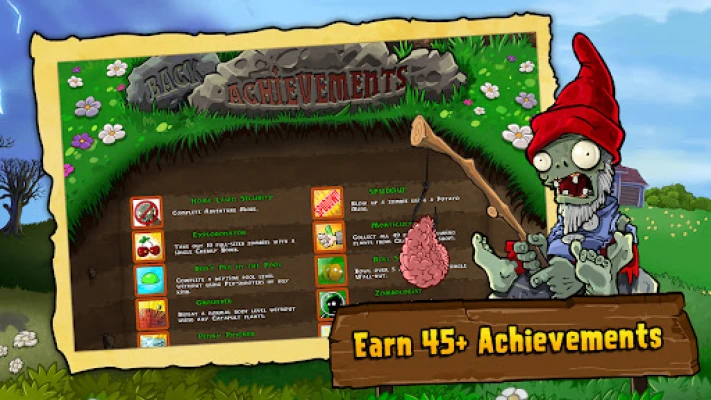
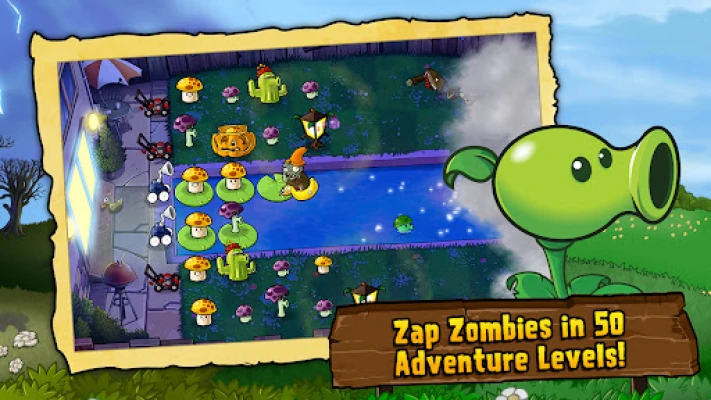
The game includes an Adventure mode with levels set in environments such as the daytime lawn, night, fog, a swimming pool, and a rooftop. It also offers Survival challenges and unlockable content as players progress. The supplied game description highlights 49 plant types, 26 kinds of zombies, achievements, collectible coins, and optional in-app purchases.
An APK is the package file format Android uses to distribute and install applications. Installing an APK manually can be useful when an app is unavailable through a device’s usual app store, but users should check that the file is authentic and compatible before installing it.
Pros
Cons
Players commonly praise Plants vs. Zombies for its charming presentation, memorable characters, and strategy that feels simple at first but becomes more demanding as new enemies and environments appear. Many enjoy experimenting with different plant combinations and returning to complete challenges or earn achievements.
Common concerns can include optional purchases, difficulty spikes, or performance and compatibility problems on some older devices. Because reviews and technical experiences vary by version, device, and region, it’s sensible to check recent feedback for the edition you plan to install.
Plants vs. Zombies remains an engaging choice for anyone who wants strategy without a steep learning curve. Its clever plant abilities, varied zombie threats, and humorous presentation make each level feel like a small puzzle, while its progression gives players reasons to keep improving their defenses.
The optional purchases and the need to verify version compatibility are worth keeping in mind, especially when installing outside an official store. Overall, it’s a strong recommendation for casual players, families, and tower-defense fans looking for a colorful game with plenty of tactical charm.
Whenever possible, download the game from a trusted official app store and review the permissions and purchase settings before playing. If you install an APK manually, use a reputable source and check that the file matches the intended game and version.
Manual installation may require enabling permission to install unknown apps for the browser or file manager you use. Only grant this permission when necessary, and consider turning it off afterward. Unofficial or modified APKs may contain malware, compromise personal information, or behave differently from the legitimate app. The game’s description also notes that use is subject to EA’s applicable user agreement and privacy and cookie policy.
Q1: Is Plants vs. Zombies APK free to play?
A1: Availability and pricing depend on the platform and region. The game description lists optional in-app purchases, including coin packs, so check the current store listing for its price and purchase options.
Q2: Do I need an internet connection to play?
A2: The core game may be playable without a continuous connection on some versions, but online features, purchases, updates, or other services may require internet access. Requirements can vary by release.
Q3: Is it safe to download the Plants vs. Zombies APK?
A3: It is safest to install the game through a trusted official store. APK files from unknown sources could be altered or contain malware, so verify the source and scan the file before installing.
Q4: What is the main objective of the game?
A4: Plant defenses across the lawn, manage your sun supply, and stop different types of zombies from reaching your home.
Q5: Does the game include different modes?
A5: The described edition includes an Adventure mode with varied environments and a Survival mode that challenges players to withstand continuing zombie waves.
Plants vs. Zombies APK
📱 Plants vs. Zombies APK Summary
Plants vs. Zombies is a playful strategy game where you defend your home by planting an assortment of unusual, zombie-fighting plants. Build a smart garden, manage your limited sun supply, and stop waves of quirky zombies from reaching your door.
- App Name: Plants vs. Zombies
- Current Version: Varies by device and store listing; check the listing before downloading
- Last Updated: Varies by platform and regional listing
- Category: Strategy
- Developer: ELECTRONIC ARTS
- Google Play Rating: Rating and review count vary by region and can change over time
💡 Introduction
Few strategy games make defending a home as entertaining as Plants vs. Zombies. Its memorable mix of garden planning, cartoon humor, and increasingly challenging enemy waves makes it easy to pick up while still rewarding careful decisions.
Whether you’re choosing where to place a Peashooter or deciding when to save sun for a powerful attack, every level turns lawn defense into a lively puzzle. It’s a great choice for players who enjoy approachable strategy and a steady stream of colorful challenges.
❓ What is Plants vs. Zombies APK?
Plants vs. Zombies is a tower-defense strategy game in which players protect a house from invading zombies by placing plants across the lawn. Each plant has a different role: some attack, some block enemies, and others provide resources or special effects. Players must respond to a range of zombie types, each with its own movement or defensive ability.
The game includes an Adventure mode with levels set in environments such as the daytime lawn, night, fog, a swimming pool, and a rooftop. It also offers Survival challenges and unlockable content as players progress. The supplied game description highlights 49 plant types, 26 kinds of zombies, achievements, collectible coins, and optional in-app purchases.
An APK is the package file format Android uses to distribute and install applications. Installing an APK manually can be useful when an app is unavailable through a device’s usual app store, but users should check that the file is authentic and compatible before installing it.
🧑💻 How to Use
- Install and open the game. Get it from an official store where available, then launch it and follow any on-screen setup instructions.
- Start Adventure mode. Early levels introduce the basic plants, enemies, and lawn layouts at a manageable pace.
- Collect sun. Sun is the resource used to plant most defenses. Gather it from the game environment and use it thoughtfully.
- Choose your plants. Select a useful mix before a level begins. Attackers deal with approaching zombies, while defensive plants can slow or block them.
- Place plants in lanes. Tap an available spot on the lawn to position a selected plant. Watch each lane and react when a new zombie appears.
- Protect the house. Prevent zombies from crossing the lawn and reaching your home. If a lane becomes dangerous, use your available plants and special tools strategically.
- Unlock more content. Complete levels to earn new plants and coins, then explore additional challenges and game modes as they become available.
⚙️ Features
- Distinctive plant defenses: Build a lineup from a broad selection of plants, including familiar choices such as Peashooters, Wall-nuts, and Cherry Bombs. Their different abilities let you tailor your strategy to each level.
- Varied zombie opponents: Face a roster of comical enemies, including pole-vaulters, snorkelers, and bucketheads. Their unique traits keep players from relying on a single defense.
- Multiple Adventure environments: Progress through settings such as day, night, fog, pool, and rooftop levels, each adding its own challenges to lawn defense.
- Survival mode: Test how long your plant setup can withstand continuing waves of zombies in an endurance-style challenge.
- Resource-based strategy: Manage a limited supply of sun and make choices about when to plant, reinforce a lane, or save resources for a more expensive defense.
- Progression and rewards: Earn new plants and collect coins as you advance, giving you more options and incentives to keep playing.
- Achievements and extra items: Work toward achievements and spend earned or purchased coins on additional items and power-ups. The game description also mentions optional coin packs and in-app purchases.
✅ Pros and ❌ Cons
Pros
- Easy-to-understand controls make it approachable for new strategy players.
- Different plants and zombie abilities encourage experimentation and planning.
- Colorful art and humorous characters give the game a distinctive personality.
- A range of environments and modes adds variety to the core defense gameplay.
- Progression, achievements, and unlockable content provide goals beyond individual levels.
Cons
- Optional in-app purchases may not suit players who prefer a completely purchase-free experience.
- Some stages can become difficult if your plant choices or resource management are poorly matched to the incoming zombies.
- Availability, compatibility, and specific features may differ across devices and versions.
- Older game releases may not receive the same updates or support as newer titles.
- Unofficial APK files can pose security and privacy risks if downloaded from unreliable websites.
📋 App Details
- App Name: Plants vs. Zombies
- Current Version: Varies by platform, device, and store listing
- Last Updated: Check the current store listing for the latest date
- File Size: Varies by version and device; check the download listing for the exact size
- Requires Android: Minimum Android requirement varies by release and device; confirm compatibility on the current listing
- Developer: ELECTRONIC ARTS
- Category: Strategy
- Content Rating: Check the current regional store listing, as ratings can differ by region and version
- In-App Purchases: Yes; purchases can generally be restricted through device settings
💬 User Reviews
Players commonly praise Plants vs. Zombies for its charming presentation, memorable characters, and strategy that feels simple at first but becomes more demanding as new enemies and environments appear. Many enjoy experimenting with different plant combinations and returning to complete challenges or earn achievements.
Common concerns can include optional purchases, difficulty spikes, or performance and compatibility problems on some older devices. Because reviews and technical experiences vary by version, device, and region, it’s sensible to check recent feedback for the edition you plan to install.
🔍 5 Best Alternative Games/Apps
- Plants vs. Zombies 2: A follow-up that expands the series with new plants, zombies, settings, and challenges. It’s a natural pick for players who want more of the same garden-defense style.
- Kingdom Rush: A well-known tower-defense series centered on placing and upgrading defenses to stop enemy waves. It offers a fantasy setting and deeper tower-upgrade strategy.
- Bloons TD 6: A colorful tower-defense game where players use different monkey towers and upgrades to pop incoming balloons. Its variety of maps and strategies makes it a strong option for long-term play.
- Defense Zone 3 HD: A more military-themed tower-defense game featuring weapon placements and tactical defense. It suits players looking for a less comedic, more traditional battlefield atmosphere.
- Grow Castle: A casual defense game that combines castle protection with hero and unit progression. It’s a good alternative for players who like building up defenses over repeated waves.
🧠 My Opinion
Plants vs. Zombies remains an engaging choice for anyone who wants strategy without a steep learning curve. Its clever plant abilities, varied zombie threats, and humorous presentation make each level feel like a small puzzle, while its progression gives players reasons to keep improving their defenses.
The optional purchases and the need to verify version compatibility are worth keeping in mind, especially when installing outside an official store. Overall, it’s a strong recommendation for casual players, families, and tower-defense fans looking for a colorful game with plenty of tactical charm.
🛡️ Privacy and Security
Whenever possible, download the game from a trusted official app store and review the permissions and purchase settings before playing. If you install an APK manually, use a reputable source and check that the file matches the intended game and version.
Manual installation may require enabling permission to install unknown apps for the browser or file manager you use. Only grant this permission when necessary, and consider turning it off afterward. Unofficial or modified APKs may contain malware, compromise personal information, or behave differently from the legitimate app. The game’s description also notes that use is subject to EA’s applicable user agreement and privacy and cookie policy.
❓ Frequently Asked Questions (FAQs)
Q1: Is Plants vs. Zombies APK free to play?
A1: Availability and pricing depend on the platform and region. The game description lists optional in-app purchases, including coin packs, so check the current store listing for its price and purchase options.
Q2: Do I need an internet connection to play?
A2: The core game may be playable without a continuous connection on some versions, but online features, purchases, updates, or other services may require internet access. Requirements can vary by release.
Q3: Is it safe to download the Plants vs. Zombies APK?
A3: It is safest to install the game through a trusted official store. APK files from unknown sources could be altered or contain malware, so verify the source and scan the file before installing.
Q4: What is the main objective of the game?
A4: Plant defenses across the lawn, manage your sun supply, and stop different types of zombies from reaching your home.
Q5: Does the game include different modes?
A5: The described edition includes an Adventure mode with varied environments and a Survival mode that challenges players to withstand continuing zombie waves.
Rate the App
Add Comment & Review
User Reviews
Based on 0 reviews
No reviews added yet.
Comments will not be approved to be posted if they are SPAM, abusive, off-topic, use profanity, contain a personal attack, or promote hate of any kind.




More »

Popular Apps

TradingView: Track All MarketsTradingView Inc.

Bus Fever Party!Lumi Games

Claude by AnthropicAnthropic PBC

Block Craft 3D:Building GameWildlife Studios

Malwarebytes - Mobile SecurityMalwarebytes

Block Blast!HungryStudio

Canva: AI Photo & Video EditorCanva

Candy Crush SagaKing

Carrom Pool: Disc GameMiniclip.com

EA SPORTS FC Soccer Mobile 27ELECTRONIC ARTS
More »
Editor's Choice

Kahoot! Play & Create QuizzesKahoot!

United AirlinesUnited Airlines

Tripwoa: Travel Plan & Trailtripwoa

trivago: Compare hotel pricestrivago N.V.

Planner 5D: AI Home DesignPlanner 5D

ibis Paint Xibis inc.

Agoda: Cheap Flights & Hotelsagoda.com

Hopper: Hotels, Flights & CarsHopper Inc.

Brilliant: Learn Math & CodingBrilliant.org

Google ClassroomGoogle LLC